
Set up your AI fitness coach
Move-based programming in 2026 requires configuring a digital environment that translates biometric data into functional movement logic. This setup defines the constraints and goals your AI model uses to generate workout sequences. Think of this as writing the prompt for your body: precise inputs yield effective outputs.
Define your biometric baseline
Your AI coach needs a clear picture of your current physical state to avoid recommending movements that are too advanced or too easy. Enter your height, weight, age, and any relevant medical history. Be honest about injuries or limitations. If you have knee pain, specify which movements aggravate it. This data allows the algorithm to filter out high-impact options and prioritize joint-friendly alternatives.
Set your movement goals
Move-based programming differs from traditional rep counting by focusing on the quality of motion. Select your primary objective: mobility, strength, endurance, or skill acquisition. If you choose "skill acquisition," the AI might prioritize complex coordination drills like handstands. If you choose "mobility," it will focus on range-of-motion exercises. This choice dictates the structure of every session that follows.
Configure session parameters
Define the practical constraints of your training. How much time do you have per session? What equipment is available? Most AI fitness platforms allow you to toggle between bodyweight-only, dumbbell, or full gym setups. Setting these parameters early ensures the generated programs are realistic. A 20-minute home workout with no equipment looks very different from a 60-minute gym session.
Test the interface
Before committing to a long-term plan, run a single generated workout. Pay attention to how the AI describes the movements. Does it use clear, actionable language? Are the progressions logical? This initial test helps you calibrate the platform’s style to your preferences. If the instructions feel vague, adjust your goal settings or try a different AI provider.
Enter your height, weight, age, and injury history to establish a safe starting point for the algorithm.
Choose between mobility, strength, endurance, or skill acquisition to guide the AI’s exercise selection logic.
Define your available time window and equipment access to ensure generated workouts are realistic and executable.
Execute one generated workout to evaluate the clarity of instructions and the appropriateness of difficulty levels.
Define functional movement patterns
Move-based programming relies on a small set of fundamental human movements. These patterns form the kinetic chain, connecting your joints and muscles into a single, efficient system. By focusing on these core mechanics, you build a foundation that transfers to real-world strength and athletic performance.
Start with the squat. This pattern teaches your body to load the hips and knees while maintaining an upright torso. It is the primary driver for lower-body power and stability.
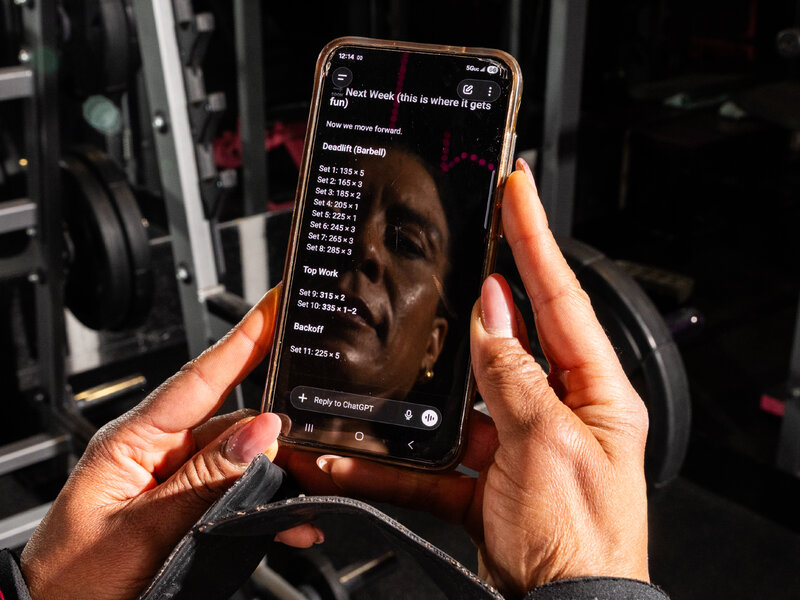
Next, incorporate the hinge. Movements like deadlifts or kettlebell swings train the posterior chain. This pattern emphasizes hip extension and protects the lower back by teaching proper spinal loading.
Add the push and pull. Horizontal and vertical presses build upper-body pushing strength, while rows and pulls develop the back. These opposing movements ensure balanced muscle development and joint health.
Configure adaptive workout algorithms
To ensure your AI generates a personalized and progressive training plan, you must adjust the core algorithmic parameters. These settings act as dials for volume, intensity, and recovery.
Volume refers to the total amount of work. Start by inputting your current weekly session count and average duration. The algorithm uses this baseline to establish a starting point. If you are new to move-based programming, begin with lower volume to allow your body to adapt without excessive strain.
Intensity dictates how hard you work during each session. Specify your preferred heart rate zones or perceived exertion levels. The AI will use these targets to modulate exercise difficulty. Higher intensity settings will trigger more demanding variations of moves, while lower settings focus on form and recovery.
Frequency is how often you train, while recovery is the rest between sessions. Input your available training days and your preferred rest periods. The algorithm balances these to prevent overtraining. Adequate recovery is critical for muscle repair and neural adaptation, ensuring you return to each session fresh and ready to progress.
Progressive overload is the gradual increase of stress on the body. Turn on the adaptive feature that automatically increases volume, intensity, or complexity over time. This ensures continuous improvement without manual intervention. The AI will monitor your performance data and adjust the next week’s plan accordingly.
By carefully configuring these parameters, you create a dynamic system that responds to your progress. This approach transforms a static workout list into a living training partner that grows with you.
Review and adjust the generated plan
An AI-generated workout is a starting point, not a finished product. Before you start training, check the output against the core principles of functional movement training. If the plan ignores your specific limitations or fails to balance movement patterns, it needs adjustment.
Check for movement balance
Functional training relies on symmetry. Look at the generated exercises and categorize them by movement pattern: squat, hinge, lunge, push, pull, and carry. A well-rounded plan includes all of these. If the AI suggests five chest presses but no back rows, the plan creates muscular imbalance. Correct this by swapping or adding opposing movements to ensure your body develops evenly.
Verify safety and load
Not all AI-generated advice accounts for your current injury history or joint mobility. Review every exercise for potential risk. If a plan includes heavy overhead presses but you have shoulder impingement, replace it with a safer variation like landmine presses. Ensure the suggested volume (sets and reps) matches your current recovery capacity. Start lighter than the plan suggests to test your form.
Compare against best practices
Use the table below to audit the AI’s output. If your plan deviates significantly from these standards, modify it before execution.
| Element | Common AI Default | Best Practice | Your Action |
|---|---|---|---|
| Exercise Selection | Isolation movements (e.g., bicep curls) | Compound movements (e.g., squats, deadlifts) | Swap isolations for compounds |
| Volume | High rep ranges (20+ per set) | Moderate rep ranges (8-12 reps) | Reduce reps, increase weight |
| Balance | Push-dominant (chest/shoulders) | 1:1 Push-to-Pull ratio | Add rows or face pulls |
| Mobility | Often omitted entirely | Included in warm-up or cool-down | Add 5 minutes of dynamic stretching |
Align with your specific goals
Finally, ensure the plan serves your primary objective. If your goal is general longevity, the AI might have overcomplicated the programming with advanced plyometrics. Simplify it. If your goal is athletic performance, ensure the plan includes explosive movements like jumps or sprints. Adjust the intensity to match your fitness targets.
Track progress and refine inputs
Move-based programming relies on a feedback loop. The AI doesn’t just generate workouts; it learns from your data. To keep your programming effective, you must log performance accurately and provide clear feedback. This section outlines the steps to capture your metrics and adjust your inputs for continuous improvement.
Before adjusting the AI, record the raw data. Log sets, reps, weight, and rest times for every session. Include subjective metrics like perceived exertion (RPE) or joint pain. This data forms the baseline the AI uses to detect plateaus or regression. Without accurate logs, the AI cannot distinguish between a bad workout and a programming error.
After logging, tell the AI what worked and what didn’t. Use natural language to describe specific issues. For example, "The squat depth was limited by ankle mobility" or "The volume was too high for my recovery." Avoid vague praise. Specific constraints allow the AI to modify movement patterns, load, or frequency to better suit your current capacity.
The AI will propose changes based on your logs and feedback. Review these adjustments before the next session. Check if the new movements align with your goals and if the load feels appropriate. If the proposed changes feel off, reject them and explain why. This human-in-the-loop step ensures safety and keeps the programming aligned with your long-term objectives.
To ensure you don’t miss critical data points, use this checklist after every workout:
-
Log sets, reps, and weight for all main movements.
-
Record RPE (Rate of Perceived Exertion) for each set.
-
Note any pain, stiffness, or mobility limitations.
-
Provide one specific piece of feedback to the AI.
-
Review the AI’s proposed adjustments for the next week.
Common questions about AI coaching
AI fitness coaching is shifting from simple rep counting to contextual movement analysis. As you build move-based programming, understanding how these tools actually work helps you avoid common pitfalls and get the most out of your training data.
What are the coding trends in 2026?
The trends shaping 2026 point to a future where coding blends with AI, system design, and responsible innovation. For fitness developers, this means broadening skills beyond basic programming into areas like AI literacy and ethical technology design. You aren’t just writing code; you’re partnering with AI to interpret complex biomechanical data accurately codeweek.eu.
Is AI coaching reliable for form correction?
AI is only as good as the sensor data it receives. While computer vision can track joint angles, it often struggles with subtle lateral movements or poor lighting conditions. Use AI as a second pair of eyes, not a replacement for professional coaching. Always verify critical form cues with video review or a certified trainer.
How do I protect my fitness data?
Move-based apps collect sensitive biometric data. Ensure any platform you use encrypts this information and offers clear opt-out controls for data sharing. Avoid apps that require excessive permissions unrelated to core functionality, such as access to your contacts or location history.
Can AI replace personal trainers entirely?
AI excels at pattern recognition and routine adherence, but it lacks the empathetic nuance of human coaching. It can adjust your load based on performance metrics, but it cannot read your emotional state or provide the motivational support that often drives long-term consistency.
No comments yet. Be the first to share your thoughts!